Camera
Point at a little clarity.
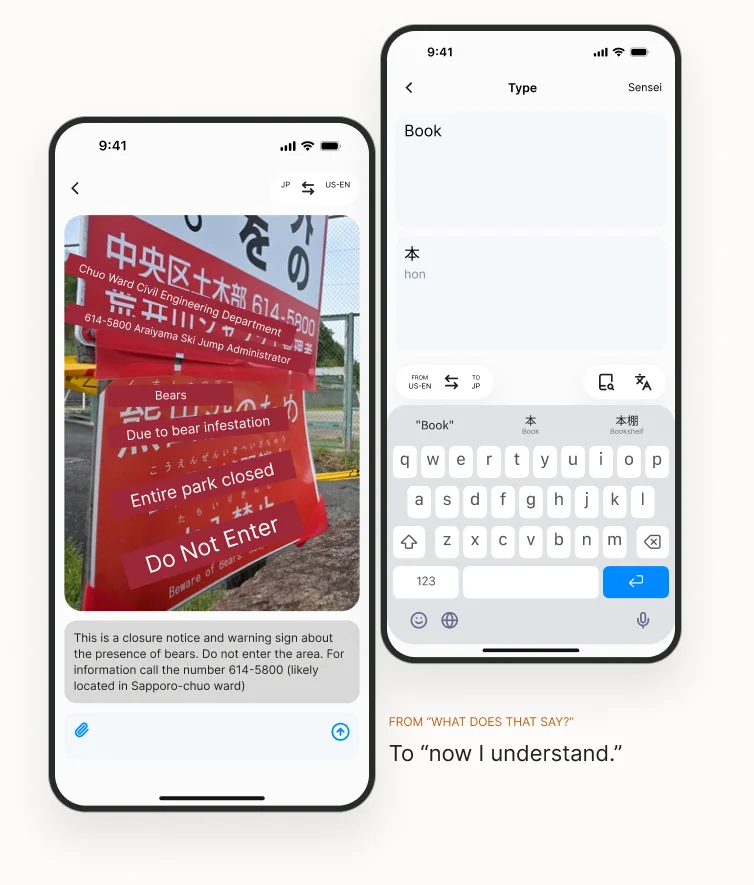
Translate the text around you, from a street sign to a notice you don’t want to miss.


A closure notice and warning about bears. Do not enter the area.
Tate Meshi Go
Tate Meshi Go
A sign. A conversation. A word you want to keep. Translate the moment, and take the understanding with you.
Camera · Image · Voice · Text
Four ways into understanding
Camera
Translate the text around you, from a street sign to a notice you don’t want to miss.
A closure notice and warning about bears. Do not enter the area.
Image
Choose a saved image and make sense of the words inside it. Useful long after the moment has passed.
Voice
Speak what you want to say. See the translation, then listen to it spoken back.
Text
Type a word or a phrase. Read the translation and keep the useful ones close.
Included in Go · Sensei
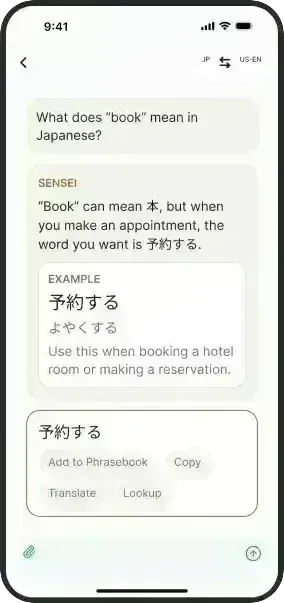
Every translation in Go comes with Sensei — a parallel AI companion built into the app. It explains why a word works, surfaces examples, and lets you follow up with questions right in the same screen.
When a word has more than one meaning, Sensei explains which fits and why — so you understand the result, not just the text.
Ask a question. Get an example. Copy a response, look it up, or add it to your phrasebook — without leaving the moment.
Sensei is built into Go, not bolted on. It responds to what you're translating, not a blank prompt.
Sensei is included in Go. Extended Sensei workflows and credits are a separate coming-soon enhancement.
Six languages. More possibilities.
Japanese, with extra care
Six languages + advanced Japanese tools. Choose 10-key flick or romaji/kana input, and find the way into Japanese that feels like you.
10-key flick / Romaji / Kana
Go + Fill · Better together
A private phrasebook that travels with you. Keep the words you need in Go, then reach for the same phrases from your Fill keyboard.
Go Fill One shared phrasebook
Choose from direct translation, hiragana, katakana or romaji for Japanese text and half or full-width characters. Data entry made easy for forms.
Meet Tate Meshi FillYour phrasebook is stored on your device, with optional sync through your private iCloud database.
Cloud translation services can be used. Prefer local processing? Choose on-device-only translation, with a possible reduction in accuracy.
Make room for understanding
Get Tate Meshi Go and make the next word a little easier.
Sensei, Image Translate, Live Translate, Text Translate, Phrasebook and History are included in Go today on iPhone and iPad. Looking ahead: Tate Meshi Full for bring-your-own LLM keys. Tate Meshi Pro for extended Sensei workflows & credits. Deeper glossaries and multi-step refinement are coming soon.



 Fill


